Benefits of Toolv.io Free Online Video Compressor
Toolv.io free video compressor reduces video file size down to your desired mb for easy sharing and streaming. Compress HD footage into 10mb, 50mb or custom sizes in seconds!
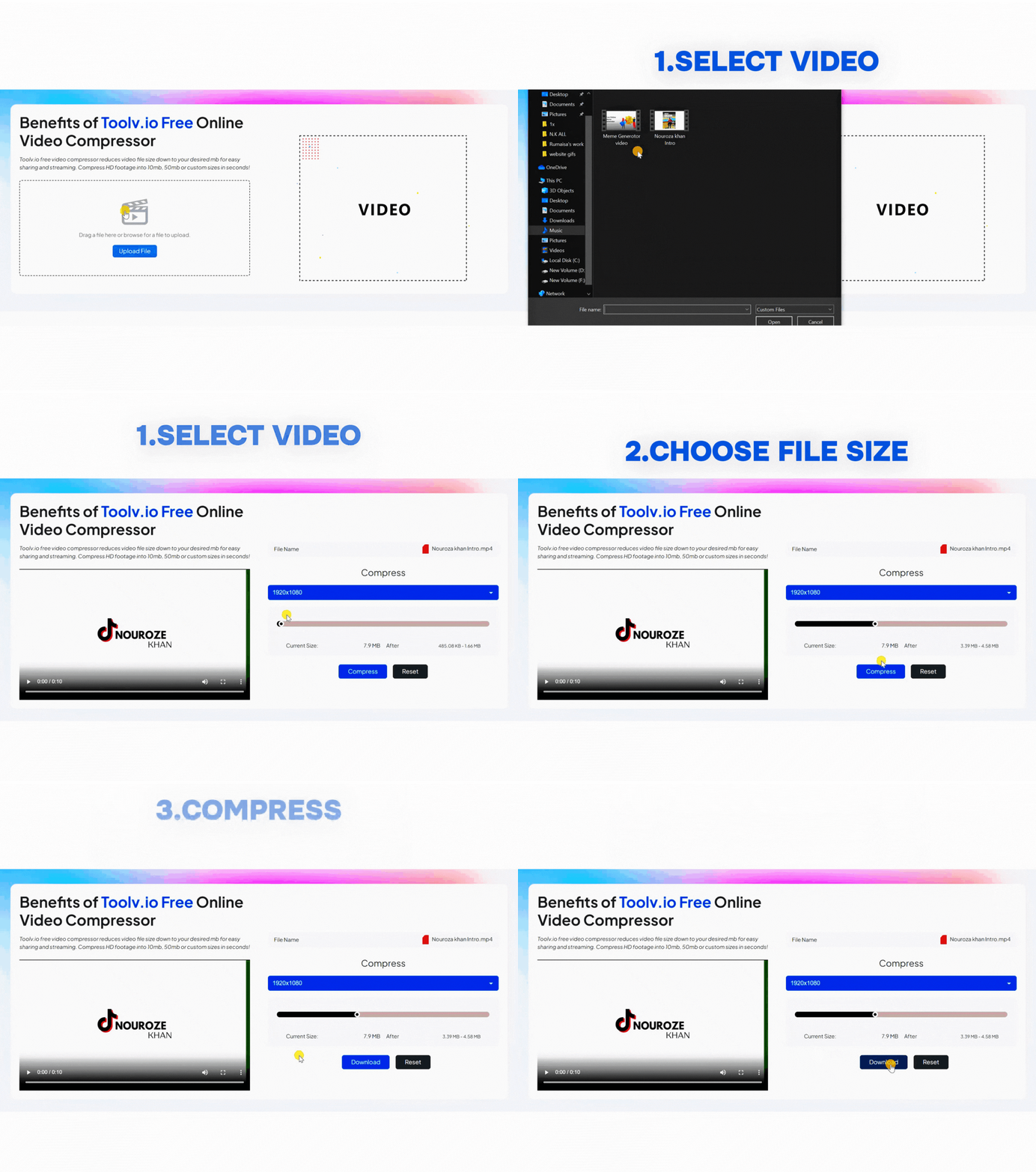

ToolV Video Compressor
The ToolV Video Compressor is a free online utility designed to reduce video file sizes for faster sharing and better performance. Unlike traditional software that requires installation, this tool works entirely in your browser, making it accessible from any device.
It supports all major video formats, including MP4, AVI, MOV, and MKV, ensuring compatibility with virtually any file type. The intuitive interface allows users to drag and drop files, select target sizes, and compress videos within seconds.
Additionally, the tool offers customizable compression settings, enabling users to choose specific output sizes such as 10MB, 50MB, or even custom values. This flexibility makes it ideal for meeting platform-specific requirements like email attachments or social media uploads.
What Is Video Compression?
Video compression is the process of reducing the size of a video file by optimizing its data without significantly affecting visual quality. It works by adjusting parameters such as bitrate, resolution, and codecs to eliminate unnecessary data while preserving the essential elements of the video.
Modern compression tools use advanced algorithms like H.264 and HEVC to achieve high-quality results with smaller file sizes. These technologies ensure that compressed videos retain clarity, color accuracy, and smooth playback.
The ToolV Video Compressor simplifies this complex process into a user-friendly experience, allowing anyone to compress videos without technical knowledge.
Why You Need a Video Compressor
Large video files can create multiple challenges in your daily workflow. Whether you’re uploading content online or sharing files with colleagues, size limitations can slow you down.
One of the biggest reasons to use a video compressor is faster uploads. Platforms like YouTube, Instagram, and email services often have file size restrictions. Compressing your videos ensures they meet these requirements while uploading quickly.
Another key benefit is reduced storage usage. High-resolution videos can take up significant space on your device or cloud storage. By compressing files, you free up valuable storage without deleting important content.
Additionally, compressed videos are easier to share and stream. Smaller files load faster, reducing buffering and improving the viewer experience. This is especially important for users with slower internet connections.
How It Works
Step 1: Upload Your Video
Start by uploading your video file directly into the tool. You can drag and drop your file or select it from your device. The tool supports all major formats, ensuring compatibility with your video.
Step 2: Choose Compression Settings
Next, select your desired compression level or target file size. You can choose preset sizes like 10MB or 50MB or enter a custom size based on your needs.
Step 3: Compress and Download
Click the compress button and let the tool process your video. Within seconds, your optimized file will be ready for download, maintaining high quality while significantly reducing size.
Features
No Quality Loss
Advanced compression algorithms ensure that your videos retain their original clarity and resolution, even after significant size reduction.
Fast Processing Speed
The tool compresses videos in seconds, allowing you to save time and improve productivity.
Browser-Based Functionality
No downloads or installations are required. Everything runs directly in your browser, making it accessible from any device.
Custom File Size Options
Users can compress videos to specific sizes such as 10MB, 50MB, or custom values, making it ideal for various use cases.
Wide Format Support
Supports popular formats including MP4, AVI, MOV, MKV, and more, ensuring compatibility with all types of video files.
Secure and Private
Your files are processed securely, ensuring privacy and protection of your data.
Performance Metrics
The ToolV Video Compressor delivers impressive performance metrics that highlight its efficiency and reliability.
It can reduce video file sizes by up to 90% or more, depending on the original file and compression settings.
Compression is completed within seconds, even for large files, thanks to optimized encoding algorithms.
The tool supports unlimited usage without restrictions, allowing users to compress as many videos as needed without any cost.
It also maintains near-original video quality, ensuring that the final output meets professional standards for clarity and resolution.
Benefits
Using the ToolV Video Compressor offers numerous advantages for both personal and professional users.
One major benefit is improved workflow efficiency. By reducing file sizes, you can upload, download, and share videos faster, saving valuable time.
Another benefit is cost savings. Since the tool is completely free, you don’t need to invest in expensive software or subscriptions.
The tool also enhances user experience by enabling smoother streaming and faster loading times. This is especially important for online platforms where performance impacts engagement.
Additionally, it supports cross-device usage, allowing you to compress videos on desktops, laptops, tablets, or smartphones without compatibility issues.
Finally, it simplifies video optimization for beginners, eliminating the need for technical knowledge or complex settings.
Frequently Asked Questions (FAQs)
Q: Is the ToolV Video Compressor free to use?
A: Yes, the tool is completely free with no hidden charges or usage limits.
Q: Will compressing videos reduce quality?
A: No, the tool uses advanced algorithms to maintain near-original quality while reducing file size.
Q: Do I need to install any software?
A: No, it is entirely browser-based, so you can use it without downloading anything.
Q: What formats are supported?
A: It supports all major formats including MP4, AVI, MOV, MKV, and more.
Q: Is it safe to use?
A: Yes, the tool ensures secure processing and protects user data during compression.
Get Started with ToolV Video Compressor
If you’re looking for a reliable, fast, and completely free way to compress videos online, the ToolV Video Compressor is the perfect solution. It combines powerful compression technology with a simple interface, making it accessible to everyone.
Whether you need to reduce file sizes for social media, email, or storage, this tool delivers outstanding results without compromising quality. Its speed, flexibility, and ease of use make it a must-have for anyone working with video content.
Start using the ToolV Video Compressor today and experience hassle-free video compression like never before.